/dev/push
An open-source alternative to Vercel and Render for deploying applications directly from GitHub with zero-config support.

/dev/push – Deploy Your Apps with a Git Push
/deploy your applications directly from GitHub with a simple git push, offering a seamless experience similar to Vercel and Render but fully open-source and language-agnostic. Whether you're working with Python, FastAPI, Django, Flask, or any other stack, /dev/push automates the deployment process, providing instant rollback capabilities, custom domains, and environment management—all while being self-hostable for complete control over your infrastructure.
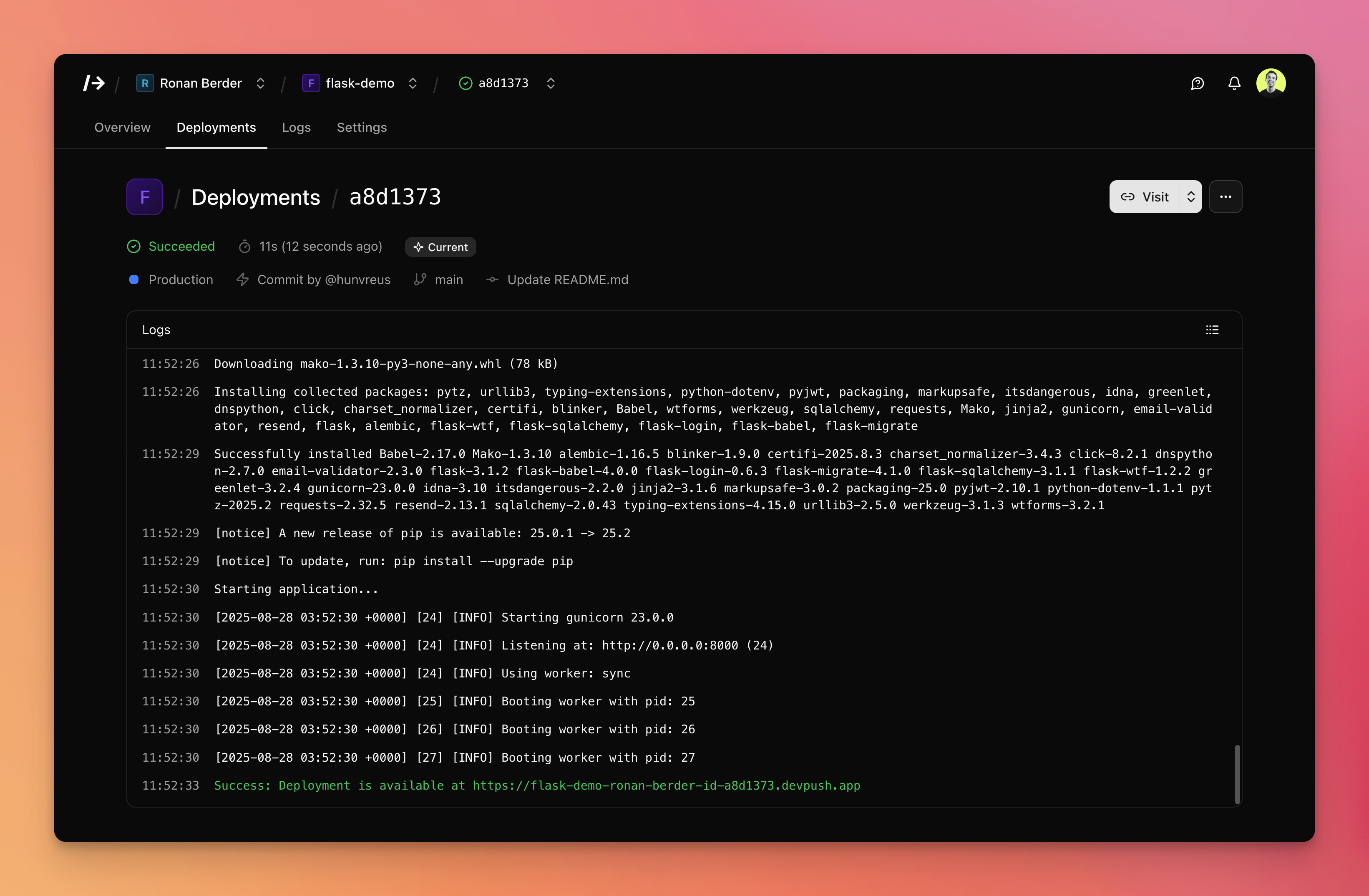!Screenshot of /dev/push
---
Key Features
- Zero-Config Deployments: Deploy applications with a single
git push—no complex configuration required. /dev/push automatically detects your stack and handles the deployment process. - Multi-Language Support: Compatible with Python, FastAPI, Django, Flask, and more. Easily extendable to support additional languages and frameworks.
- Instant Rollback: Quickly revert to previous deployments with one click, ensuring minimal downtime and seamless recovery from errors.
- Custom Domains: Assign custom domains to your deployments for a professional and branded experience.
- Environment Management: Create and manage different environments (e.g., staging, production) with dedicated URLs for each.
- Docker-Based Orchestration: Uses Docker containers for consistent and isolated deployments, ensuring reproducibility and scalability.
- Traefik Integration: Leverages Traefik for reverse proxy and load balancing, providing robust routing and SSL termination.
- FastAPI Backend: Built with FastAPI for high performance and scalability, ensuring a responsive and efficient deployment platform.
- HTMX & Basecoat UI: Utilizes HTMX for dynamic interactions and Basecoat for a clean, modern user interface.
- Self-Hostable: Fully open-source and self-hostable, giving you complete control over your deployment infrastructure.
- GitHub Integration: Seamlessly integrates with GitHub for source control and deployment triggers, making it easy to manage your projects.
---
Architecture
/deploy is designed with a modular and scalable architecture, leveraging modern technologies to ensure reliability and performance:
- Frontend: Built with HTMX and Basecoat, providing a dynamic and responsive user interface.
- Backend: Powered by FastAPI, handling API requests, deployment orchestration, and user management.
- Deployment Engine: Uses Docker Compose, Docker CLI, and Traefik to manage containerized deployments, routing, and SSL certificates.
- Database: Stores user data, project configurations, and deployment metadata for easy management and retrieval.
- Git Integration: Connects to GitHub to monitor repository changes and trigger deployments automatically.
The architecture is designed to be extensible, allowing developers to add support for new languages, frameworks, and deployment strategies with minimal effort.
---
Use Cases
- Developers: Ideal for developers who want a Vercel-like experience but prefer open-source solutions or need multi-language support.
- Startups: Perfect for startups looking to deploy applications quickly and efficiently without the overhead of complex deployment pipelines.
- Open-Source Projects: Great for open-source projects that require a reliable and self-hostable deployment platform.
- Educational Purposes: Useful for educational settings where students can learn about deployment, containerization, and DevOps practices.
- Small to Medium Teams: Teams that need a simple, scalable, and cost-effective way to manage deployments across multiple projects.
---
Getting Started
Prerequisites
- A GitHub account
- A project hosted on GitHub
- Docker and Docker Compose installed on your server (if self-hosting)
- A domain name (optional, for custom domains)
Step-by-Step Setup
- Sign Up or Self-Host:
- Use the online demo to try /dev/push (resets every hour).
- For production use, self-host /dev/push by following the GitHub repository.
- Connect Your GitHub Account:
- Link your GitHub account to /dev/push to enable repository access and deployment triggers.
- Import Your Project:
- Select the repository you want to deploy from the list of available projects.
- Configure Deployment Settings:
- Choose your preferred stack (e.g., Python, FastAPI, Django, Flask).
- Set environment variables if needed.
- Deploy:
- Push changes to your GitHub repository, and /dev/push will automatically deploy your application.
- Manage Environments:
- Create staging or production environments with dedicated URLs.
- Assign custom domains to your deployments for a professional touch.
- Monitor and Rollback:
- Monitor your deployments in real-time.
- Use the instant rollback feature to revert to previous versions if issues arise.
---
Community & Support
- GitHub Repository: github.com/hunvreus/devpush
- Discord Chat: devpu.sh/chat
- Sponsorship: Support the project by sponsoring the creator
- Issue Reporting: Report bugs or request features via GitHub Issues
- Pull Requests: Contribute to the project by submitting pull requests
---
Built with ❤️ by Ronan Berder and the open-source community.